Category Availability
Request the available categories using the CruiseCategoryAvailRQ/RS message pair. A list of available categories will be returned by the cruise line and the traveler can then select a category.
Request Example
POST https://bookings-stage.sw.travelhx.com/ota/rest/OTA_CruiseCategoryAvailRQ
Content-Type: application/xml
<OTA_CruiseCategoryAvailRQ xmlns="http://www.opentravel.org/OTA/2003/05" CorrelationID="0d4a7548-9126-4467-b8fe-b863d0bd4b78" Version="1.0">
  <POS>
    [..]
  </POS>
  <Guest/>
  <Guest/>
  <GuestCounts>
    <GuestCount Quantity="2" Code="10"/>
  </GuestCounts>
  <SailingInfo>
    <SelectedSailing VoyageID="CS21711JUNKTN">
      <CruiseLine/>
    </SelectedSailing>
  </SailingInfo>
  <SelectedFare FareCode="BESTPRICE"/>
</OTA_CruiseCategoryAvailRQ>
Response Example
Response will contain a list of CategoryOption elements with available cabin categories:
<vx:OTA_CruiseCategoryAvailRS xmlns:ns3="http://www.versonix.com/ota"
  xmlns:ns4="http://schemas.xmlsoap.org/soap/envelope/"
  xmlns:vx="http://www.opentravel.org/OTA/2003/05"
  CorrelationID="0d4a7548-9126-4467-b8fe-b863d0bd4b78"
  TargetName="SW_OTA_TEST@ORADEV"
  TimeStamp="2021-08-27T14:16:16.900"
  Version="1.999">
  <vx:Success/>
  <vx:SailingInfo>
    [..]
  </vx:SailingInfo>
  <vx:FareOption FareCode="BESTPRICE">
    <vx:CategoryOptions>
      <vx:CategoryOption GenericCategoryCode="A_GNR" ListOfCategoryQualifierCodes="" MaxOccupancy="2" PricedCategoryCode="A" Status="36">
        <vx:PriceInfos>
          <vx:PriceInfo Amount="325.55" BreakdownType="DBL" ChargeTypeCode="30" CurrencyCode="USD"/>
          <vx:PriceInfo Amount="225.12" BreakdownType="1GT" ChargeTypeCode="7" CurrencyCode="USD"/>
          <vx:PriceInfo Amount="100.43" BreakdownType="2GT" ChargeTypeCode="7" CurrencyCode="USD"/>
        </vx:PriceInfos>
      </vx:CategoryOption>
      [..]
  </vx:CategoryOptions>
  </vx:FareOption>
</vx:OTA_CruiseCategoryAvailRS>
Including Waitlisted Categories
By default only categories that are available (OK) or sold on guarantee (GTY) are returned. To also see waitlisted categories for a sailing, add a SearchQualifiers element with the statuses you want. In OTA_CruiseCategoryAvailRQ this element is a direct child of the request (unlike Sailing Availability, where it sits inside CruiseLinePrefs/CruiseLinePref):
<OTA_CruiseCategoryAvailRQ Version="1.0" xmlns="http://www.opentravel.org/OTA/2003/05">
    <POS>
        <Source ISOCurrency="AUD">
            <RequestorID ID="242667" Type="5" ID_Context="SEAWARE"/>
            <BookingChannel Type="1">
                <CompanyName>DIRECT-AGENCY</CompanyName>
            </BookingChannel>
        </Source>
    </POS>
    <Guest/>
    <Guest/>
    <GuestCounts>
        <GuestCount Quantity="2" Code="10"/>
    </GuestCounts>
    <SailingInfo>
        <SelectedSailing VoyageID="_@FREUR01-270423">
            <CruiseLine/>
        </SelectedSailing>
    </SailingInfo>
    <SearchQualifiers>
        <Status Status="38"/>
        <Status Status="46"/>
        <Status Status="47"/>
    </SearchQualifiers>
    <SelectedFare FareCode="BESTPRICE"/>
</OTA_CruiseCategoryAvailRQ>
The statuses you list replace the default OK/GTY filter, so the search returns exactly the kinds of inventory you ask for — <Status Status="46"/> on its own returns waitlisted categories only.
| Status | Meaning | Seaware inventory result | Seaware availability mode |
|---|---|---|---|
| 36 | Available | OK |
OK |
| 38 | Closed | NO |
ALL |
| 46 | Waitlisted | WTL |
WTL |
| 47 | Guaranteed | GTY |
GTY |
Status 38 maps to the Seaware ALL availability mode, which opens the search to every kind of inventory. That is why the request above returns everything — available, guarantee and waitlisted categories alike — and why 38/46/47 is the combination to use when you want waitlisted categories shown alongside normal availability.
Each CategoryOption in the response carries its own Status attribute, so waitlisted categories can be told apart from bookable ones. See OTA Code Lists for the full status list and SwOTA Shopping for further examples.
Multiple Fare Codes
If several SelectedFare elements provided in the request the behavior depends on the SwOtaFareCodeModeEnabled Seaware setting configured by the cruise line:
- Fare Code mode (
SwOtaFareCodeModeEnabled=Y): EachSelectedFaretriggers a separate category search, returning separateFareOptionelements in response. This lets you query available categories for several different promotions in a single request. - Promotions mode (
SwOtaFareCodeModeEnabled=N): All promotion codes are applied at the same time, resulting in a singleFareOptionelement in response with only categories that use all provided promotions.
Price Itemization
There is a limited ability to view itemized pricing in category availability results. By default the result will only contain per booking and per guest totals.
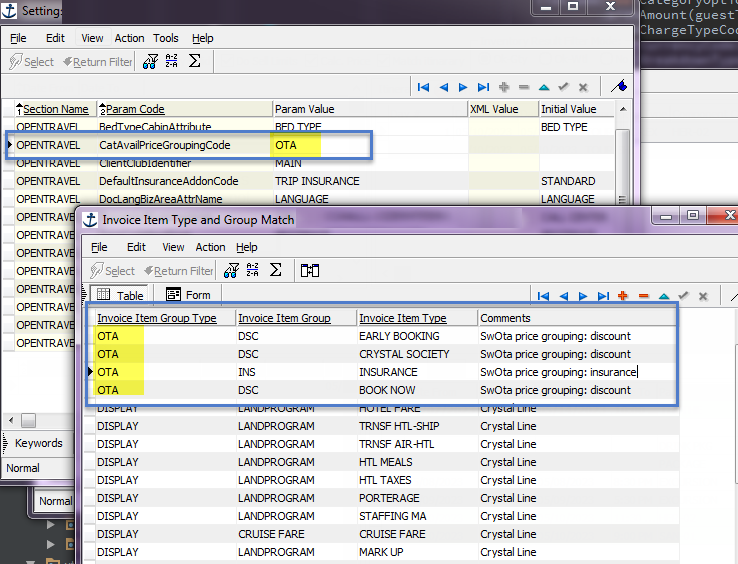
If the setting CatAvailPriceGroupingCode is configured in Seaware (per booking source) then that grouping will be applied to this response and SwOta will show itemized pricing in PriceInfos using code value as grouping.
Limitations
The limitation here occurs from the OTA specification restriction on the number of PriceInfo elements (maxOccurs="8"), the public specification limits it to just 8 elements.
Integration partners that adhere strictly to those limits and work with SwOTA in VXAdditions=off mode will be effectively unable to use this feature due to this limit. If the VXAdditions are allowed the SwOTA specification lifts this restriction (maxOccurs="unbounded").
Example Grouping Setup
Example Itemized Response
<vx:CategoryOption Status="36" MaxOccupancy="4" ListOfCategoryQualifierCodes="4" PricedCategoryCode="CS">
    <vx:PriceInfos>
        <vx:PriceInfo BreakdownType="DBL" ChargeTypeCode="30" CurrencyCode="USD" Amount="31410"/>
        <vx:PriceInfo BreakdownType="DBL/DSC" ChargeTypeCode="30" CurrencyCode="USD" Amount="-12780"/>
        <vx:PriceInfo BreakdownType="DBL/CRUI" ChargeTypeCode="30" CurrencyCode="USD" Amount="43840"/>
        <vx:PriceInfo BreakdownType="DBL/PORT" ChargeTypeCode="30" CurrencyCode="USD" Amount="350"/>
        <vx:PriceInfo BreakdownType="1GT" ChargeTypeCode="7" CurrencyCode="USD" Amount="15705"/>
        <vx:PriceInfo BreakdownType="1GT/DSC" ChargeTypeCode="7" CurrencyCode="USD" Amount="-6390"/>
        <vx:PriceInfo BreakdownType="1GT/CRUI" ChargeTypeCode="7" CurrencyCode="USD" Amount="21920"/>
        <vx:PriceInfo BreakdownType="1GT/PORT" ChargeTypeCode="7" CurrencyCode="USD" Amount="175"/>
        <vx:PriceInfo BreakdownType="2GT" ChargeTypeCode="7" CurrencyCode="USD" Amount="15705"/>
        <vx:PriceInfo BreakdownType="2GT/DSC" ChargeTypeCode="7" CurrencyCode="USD" Amount="-6390"/>
        <vx:PriceInfo BreakdownType="2GT/CRUI" ChargeTypeCode="7" CurrencyCode="USD" Amount="21920"/>
        <vx:PriceInfo BreakdownType="2GT/PORT" ChargeTypeCode="7" CurrencyCode="USD" Amount="175"/>
    </vx:PriceInfos>
</vx:CategoryOption>
Note
- The
BreakdownTypefield is limited by 8 characters - First part is always 3 character breakdown type (DBL, SGL, 1GT etc.) and the separator character
- Invoice item group codes should be limited in setup by 4 characters so they always fit into the field
- Longer values will be cut to first 4 characters
- All invoice needs to be grouped in setup, otherwise SwOTA will return invoice item types like "PORT" and "CRUI" for "PORT CHARGES" and "CRUISE FARE" invoice item types that were not mapped in OTA grouping
Price Itemization for Cached SailAvail
The OTA_CruiseSailAvailRQ call with IncludeCategoriesInd="true" will include category availability for each returned SailingOption.
Warning
Use with caution, as it may take a while to calculate all that availability.
The price breakdown for the categories in that call is calculated (and configured) the same way as for the OTA_CruiseCategoryAvailRQ/RS described above.
For the cached version of that call (<TPA_Extensions IncludeCategoriesInd="true" UseCacheInd="true"/>) the price breakdown is configured in Seaware Quoting Rules. Set up fields there with same names as Invoice Group names in the non-cached setup to make the pricing consistent between cached and non-cached call.