SwOTA Payments Support
The message pair CruisePaymentRQ/RS allows to create a payment transaction in Seaware.
Credit Card Payment Example
Here is a simple example for a credit card payment:
POST https://bookings-stage.sw.travelhx.com/ota/rest/OTA_CruisePaymentRQ
Content-Type: application/xml
<OTA_CruisePaymentRQ xmlns:ns4="http://www.versonix.com/ota" xmlns="http://www.opentravel.org/OTA/2003/05" Version="1.00">
  <POS>
    [..]
  </POS>
  <ReservationPayment>
    <ReservationID ID="1234" Type="14"/>
    <PaymentDetail PaymentType="5">
      <PaymentCard ExpireDate="1229">
        <CardType Code="1">VISA</CardType>
        <CardHolderName>TEST</CardHolderName>
        <CardNumber>
          <PlainText>4111111111111111</PlainText>
          <TPA_Extensions>
            <ns4:CCServerResponse>Test CC Server Response</ns4:CCServerResponse>
          </TPA_Extensions>
        </CardNumber>
      </PaymentCard>
      <PaymentAmount Amount="100" CurrencyCode="USD"/>
    </PaymentDetail>
  </ReservationPayment>
</OTA_CruisePaymentRQ>
Payment Processing Models
The processing of the payment can be done in 3 places:
1. Payment Processed by Client Application
In this case the client processes the payment, they can and should supply the credit card processor's details/response in the PaymentDetail/PaymentCard/CardNumber/TPA_Extensions/CCServerResponse element.
The OTA server will simply log the payment (successful or failed) in Seaware by creating an Accounting transaction (and Accepting or Declining it right away). The provided details like CC number (or just last 4 digits) or CCServerResponse will be saved in Seaware.
To pass external payment identifier the PaymentDetail/PaymentCard/ThreeDomainSecurity/Results/XID attribute should be used.
To "log" a failed attempt at payment in Seaware use a status field in the OTA payment request: //PaymentCardType/ThreeDomainSecurity/Results/@PAResStatus=N attribute for the input status in the request ("Y" or no value would mean successful payment).
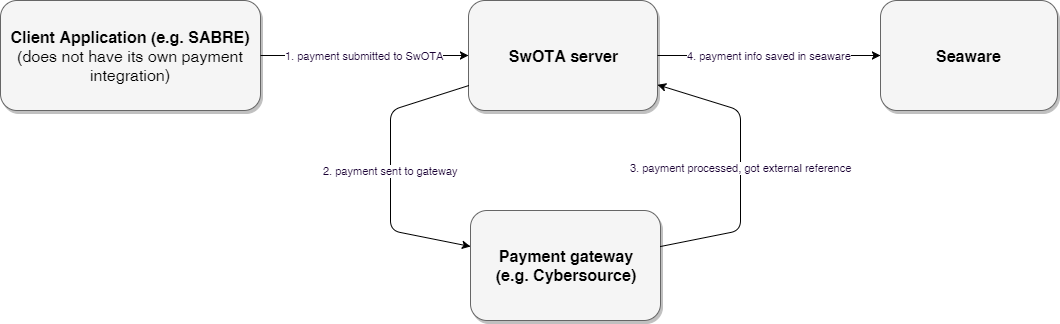
2. Payment Processed by the SwOTA Server
Currently SwOTA server only supports CC payments through Cybersource (if used and configured by the cruise line). If the SwOTA server works this way then every time it accepts OTA_CruisePaymentRQ request with CC payment information it will submit it to the Cybersource gateway, make payment there, and then pass reference number to Seaware when creating a payment transaction there.
3. Payment Processed by Seaware
In this case the Seaware Core is processing the payment when SwOTA creates an accounting transaction there, upon receiving the OTA_CruisePaymentRQ request.
This requires merchant configuration in Seaware and happens if CCServerResponse is not provided in the request.
Additional Payment Types
Token Payment
Example of the token payment (part of the request with payment details):
<PaymentDetail PaymentType="5">
  <PaymentCard ExpireDate="1221">
    <CardType Code="1">VISA</CardType>
    <CardHolderName>TEST</CardHolderName>
    <CardNumber Token="12391512312312301233" TokenProviderID="CYBERSOURCE">
      <TPA_Extensions>
        <ns4:CCMerchant>VXTEST</ns4:CCMerchant>
        <ns4:CCServerResponse>CC processor response details</ns4:CCServerResponse>
      </TPA_Extensions>
    </CardNumber>
   </PaymentCard>
  <PaymentAmount Amount="100" CurrencyCode="USD"/>
</PaymentDetail>
Check Payment
Sample check payment:
<PaymentDetail PaymentType="7">
  <BankAcct CheckNumber="1234"/>
  <PaymentAmount CurrencyCode="USD" Amount="15"/>
</PaymentDetail>
Payment Response
Response will have details on the created Seaware accounting transaction (ID, amount, currency, form of trans (mapped to PaymentType code)):
<vx:OTA_CruisePaymentRS xmlns:ns3="http://www.versonix.com/ota"
  xmlns:ns4="http://schemas.xmlsoap.org/soap/envelope/"
  xmlns:vx="http://www.opentravel.org/OTA/2003/05" Version="1.00">
  <vx:Success/>
  <vx:ReservationPayment>
    <vx:ReservationID ID="10277" ID_Context="SEAWARE" Type="14"/>
    <vx:PaymentDetail PaymentType="7" ReferenceID="100062">
      <vx:PaymentAmount Amount="15" CurrencyCode="USD"/>
    </vx:PaymentDetail>
  </vx:ReservationPayment>
</vx:OTA_CruisePaymentRS>
Payment Card Encryption
SwOTA implements data encryption using TripleDES (EncryptionMethod="DESede") algorithm. Sample of encrypted CardNumber element that can be used in OTA_CruisePaymentRQ or OTA_CruiseBookRQ when paying with a credit card:
<CardNumber
      EncryptedValue="/moY7SbN0j0rDLUm6v1fZ12GWbojCj55"
      EncryptionKey="123456789"
      EncryptionMethod="DESede"/>
Usually the EncryptionKey attribute would be omitted from the request, and instead configured by the cruise line when deploying the SwOTA server.
If EncryptionMethod is omitted, the method will be used that is configured by the cruise line as well. If that configuration property is set to blank then the "dummy" no-encryption "method" will be used (pass the EncryptedValue as is).
Coupon Payment
SwOTA can process Client Coupon payments using the PaymentDetail/Voucher element. Provide Coupon ID in the Identifier field.
Client Coupons can be looked up using OTA_ReadRQ for profile lookup. The coupons, if exist (and only active ones), will be returned in the Customer/PaymentForm/Voucher elements:
Identifier: Coupon IDSupplierIdentifier: User Defined Coupon IDSeriesCode: Coupon CategoryValueType: Coupon ClassEffectiveDate/ExpireDate: Applicability Date RangeAmountandAmountLeft: VXAddition fields (only work if enabled)
Coupon Response Example
Example fragment from the OTA_ProfileReadRS:
<vx:Customer Deceased="false" BirthDate="1984-07-11" Gender="Male">
    <vx:PersonName>
        <vx:GivenName>lmrawq</vx:GivenName>
        <vx:Surname>nobr</vx:Surname>
    </vx:PersonName>
    [...]
    <vx:PaymentForm>
        <vx:Voucher SupplierIdentifier="157234" Identifier="157234" ValueType="FUTURE VOYAGE CREDIT" EffectiveDate="2019-05-19" ExpireDate="2020-05-19"/>
    </vx:PaymentForm>
    <vx:PaymentForm>
        <vx:Voucher SupplierIdentifier="100021" Identifier="100021" ValueType="FUTURE CRUISE VOUCHER" Amount="5000" AmountLeft="5000" EffectiveDate="2018-07-02" ExpireDate="2019-07-02"/>
    </vx:PaymentForm>
</vx:Customer>
Note
Implementation limited to 100 maximum PaymentForm elements (by OTA specification).
Payment when Creating a Booking
Additionally to the OTA_CruisePaymentRQ/RS message pair, the OTA_CruiseBookRQ/RS call also can be used to submit payment along with the booking in a single call.
This means that the SwOTA server will try to apply the payment only if no fatal errors occurred while storing the booking, right after it is stored. This is done using OTA_CruiseBookRQ/PaymentOptions/PaymentOption element that has similar structure as the Payment element used in OTA_CruisePaymentRQ.