SwOTA Stateful Mode (Temporary Storage Support, new/edit mode)
SwOTA supports working with temporary storage and temporary bookings with the help of TransactionActionCode attribute in the OTA_CruiseBookRQ request root element.
Note
This functionality can be enabled or disabled with the Seaware setting SwOtaStatefulMode.
Terminology
For the purpose of this document we will be using the following terms:
Stored Booking
Stored booking has a positive Reservation ID, it holds inventory and it is a finalized and permanently saved booking in Seaware system.
Temporary Booking
Temporary booking is a booking in temporary storage that also holds inventory (cabin, shorex, land, etc.), but it is not finalized. Removing it from temporary storage will free inventory and destroy the booking record. Temporary booking has negative Reservation ID.
Locked Booking
Locked booking is a booking in temporary storage that has been previously stored, then was locked for further editing (e.g. to add or remove shorex to existing booking). It has same positive Reservation ID with which it was originally stored. When released from temporary storage (unlocked) the additional inventory that may have been held by it (e.g. the added shorex) is released. Or if booking is stored instead of being released, the added components (e.g. shorex) become permanently belonging to that booking.
Temporary Booking Identification
Generally a temporary booking or a locked booking will be presented in SwOTA messages with ReservationID/@Type="23" and will additionally to ReservationID/ID have a second identifier passed in the ReservationID/@Instance attribute.
This instance ID (inside Seaware it is called StateKey) identifies a single case of placing a booking (existing or new) into temporary storage and is needed to safeguard those bookings from being picked up by other users while in use (being edited) by the user who created/locked them (put into temporary storage).
TransactionActionCode Attribute
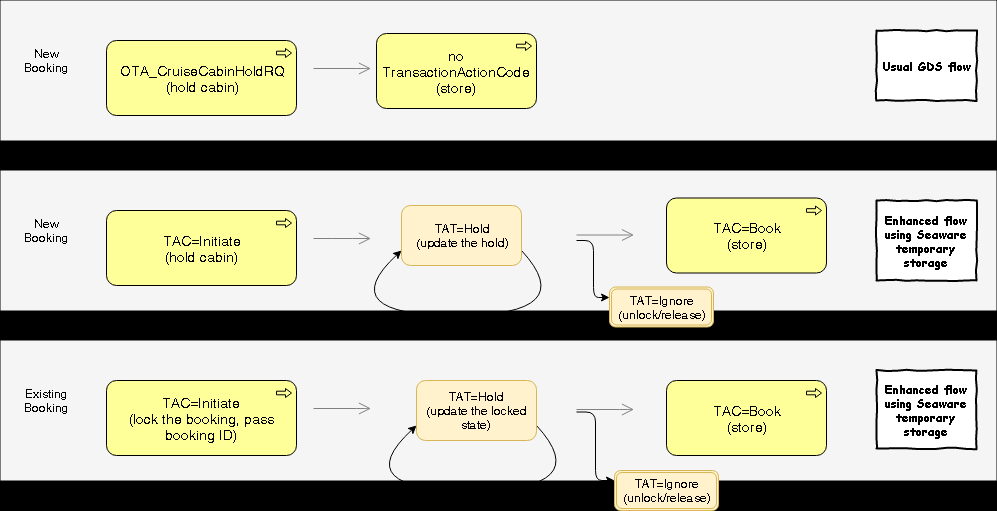
The TransactionActionCode attribute in the OTA_CruiseBookRQ provides the ability to not only permanently store booking using that message, but also create a temporary new booking (and hold inventory), to lock existing booking to provide the user time to finalize the changes to the booking (or the new booking details) before storing.
Possible Values
| Value | Description |
|---|---|
| (no value) | If no reservation ID provided then this message will create a new booking, store it and unlock. If reservation ID ( Type="14") is provided, this message will lock the pre-existing booking, update it, then store it and unlock it. Cannot accept temporary booking ID ( Type="23"). This is the only value which allows to pick up a cabin hold created by OTA_CruiseCabinHoldRQ. |
| Initiate | For new booking: Creates a new temporary booking. Request should not have a reservation ID. For existing booking: Lock an existing booking in order to edit it and hold new additional inventory, and also so no other users do concurrent changes to it. The ID of an existing booking must be provided in ReservationID element with Type="23". Note that for existing booking this message will lock the booking and update it to the state passed in the request. If the goal is to just lock an existing booking without update then OTA_ReadRQ with UniqueID/Type="23" should be used instead. |
| Hold | Used to update a booking in temporary storage and keep it there. Temporary/locked booking id must be provided (with Instance attribute) and the booking must be in temporary storage (can be used after Initiate, Hold). |
| Book | Stores changes made previously in temporary storage and unlocks the booking. Temporary or locked booking ID ( Type=23) must be provided, with Instance attribute (can be used after Initiate, Hold). In special case where absolutely no data is provided in the request except reservation ID (with ID, Type, Instance and ID_Context attributes) this message will not perform any updates to the temporary booking and will just store it. Otherwise the booking will be updated to the state passed in this request and then stored. |
| Ignore | Unlock a temporary or locked booking. Release the temporarily held inventory and roll back booking state to the previously stored state (if working with existing booking) or fully destroy the booking (if working with a new booking that was never stored). Temporary booking ID ( Type=23) must be provided. |
Usage Examples
Creating a New Temporary Booking
<OTA_CruiseBookRQ TransactionActionCode="Initiate" [...]>
  <POS>[..]</POS>
  <!-- No ReservationID -->
  <SailingInfo>[..]</SailingInfo>
  <ReservationInfo>[..]</ReservationInfo>
</OTA_CruiseBookRQ>
Response will include Type="23" and Instance attribute:
<ReservationID ID="-12345" Type="23" Instance="ABC123DEF456" [...]/>
Updating a Temporary Booking
<OTA_CruiseBookRQ TransactionActionCode="Hold" [...]>
  <POS>[..]</POS>
  <ReservationInfo>
    <ReservationID ID="-12345" Type="23" Instance="ABC123DEF456" ID_Context="SEAWARE"/>
    <!-- Updated guest and component details -->
  </ReservationInfo>
</OTA_CruiseBookRQ>
Storing a Temporary Booking
<OTA_CruiseBookRQ TransactionActionCode="Book" [...]>
  <POS>[..]</POS>
  <ReservationInfo>
    <ReservationID ID="-12345" Type="23" Instance="ABC123DEF456" ID_Context="SEAWARE"/>
    <!-- Final booking details -->
  </ReservationInfo>
</OTA_CruiseBookRQ>
Response will have positive ID with Type="14":
<ReservationID ID="54321" Type="14" ID_Context="SEAWARE" [...]/>
Canceling/Ignoring a Temporary Booking
<OTA_CruiseBookRQ TransactionActionCode="Ignore" [...]>
  <POS>[..]</POS>
  <ReservationInfo>
    <ReservationID ID="-12345" Type="23" Instance="ABC123DEF456" ID_Context="SEAWARE"/>
    <GuestDetails><GuestDetail/></GuestDetails>
  </ReservationInfo>
  <SailingInfo/>
</OTA_CruiseBookRQ>
Locking an Existing Booking
To lock an existing stored booking for editing:
<OTA_ReadRQ [...]>
  <POS>[..]</POS>
  <ReadRequests>
    <ReadRequest>
      <UniqueID ID="54321" Type="23" ID_Context="SEAWARE"/>
    </ReadRequest>
  </ReadRequests>
</OTA_ReadRQ>
Response will include the locked booking with Instance attribute.
Benefits of Stateful Mode
- Inventory Protection: Hold inventory (cabins, excursions, etc.) while building the booking
- Multi-step Booking: Build complex bookings across multiple API calls
- Preview Changes: See pricing and availability effects before committing
- Concurrent Edit Protection: Prevent multiple users from modifying the same booking
- Rollback Capability: Discard changes without affecting the stored booking